
The Australian Architecture Onboarding Challenge
As an administrator in an Australian architecture firm, you know client onboarding involves more than just creative discussions. Between ATO tax documents for sole trader clients, ASIC forms for corporate entities, statutory declarations for planning applications, and rental bond paperwork for commercial leases, you're managing sensitive documents that must be handled correctly.
Australian Privacy Principles require careful handling of client information, while ATO digital reporting demands accurate, properly formatted submissions. You need professional documents that reflect your firm's standards, but you don't want to spend hours formatting or wrestling with incompatible file types.
That's where browser-based PDF tools come in. With PDF Master's 33 tools, you can handle all these document needs without installing software or compromising on professionalism.

Professional First Impressions: The AI CV Generator
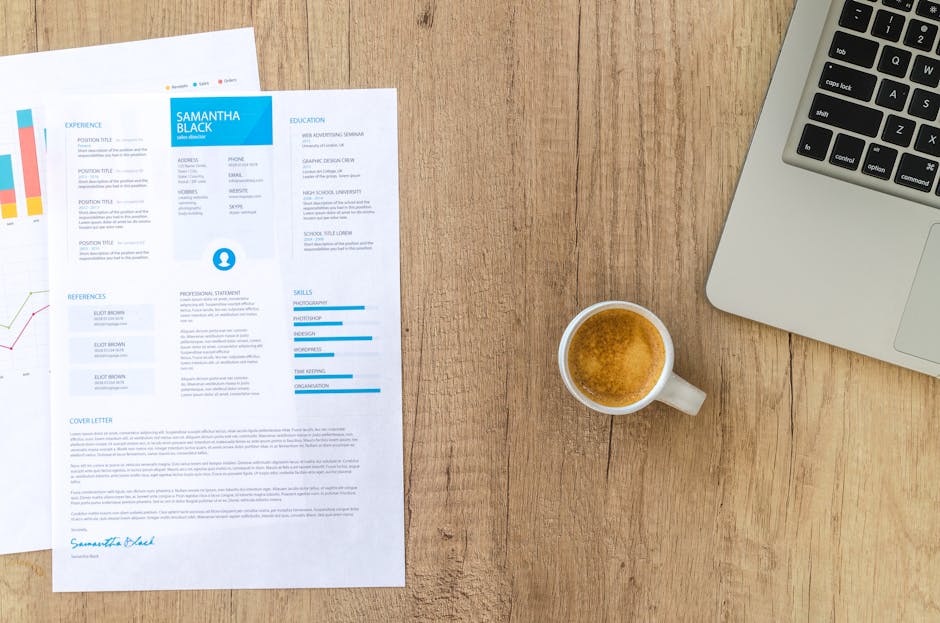
Before you even see a client's documents, they need to see yours. A professional CV establishes credibility from the first contact. Our AI CV Generator creates polished, architect-appropriate resumes in minutes.
Here's how it works for architecture professionals:
- Choose your template: Select from Professional, Modern, Creative, or Minimal designs. For architecture firms, the Professional or Modern templates work well to balance creativity with business credibility.
- Enter your details: Input personal information, work experience (including specific architectural projects), education, and skills. Include your ARBV registration number and relevant certifications.
- Let AI enhance your content: The tool automatically improves your descriptions with powerful action verbs. "Designed residential buildings" becomes "Spearheaded innovative residential design solutions."
- Select your tone: Choose professional, confident, or friendly. For client-facing CVs, professional works best.
- Download your PDF: Get a ready-to-share PDF that presents your firm's expertise clearly.
This tool is perfect for creating consistent CVs for all partners and senior architects, ensuring every client sees the same level of professionalism.
Handling Australian Compliance Documents
Once you've impressed clients with your professional presentation, you need to handle their documents efficiently. Australian architecture firms regularly encounter these specific document types:
ATO Tax Documents: When working with sole trader architects or individual clients, you may need to review or submit ATO forms. Use the Word Viewer to quickly check .docx files clients send without needing Microsoft Office installed. For final submissions, convert documents to PDF using Word to PDF to ensure formatting remains intact for ATO digital reporting.
ASIC Forms: Corporate clients require ASIC documentation. After filling these forms, use PDF Flatten to merge all form fields and annotations into a single flat layer. This creates a non-editable, print-ready version that prevents accidental changes to important details like company numbers or director information.
Statutory Declarations: For planning applications or compliance declarations, you need clean, professional documents. Convert any existing documents to PDF format, then use PDF Watermark to add "DRAFT" or "CONFIDENTIAL" markings as needed during review stages.
Rental Bond Paperwork: When securing office or studio space, extract specific pages from lease agreements using PDF to Images. Convert key pages to JPG format to include in email updates or presentation materials for stakeholders.
Building Your Efficient Onboarding Workflow
Here's a practical workflow combining multiple PDF Master tools for smooth Australian architecture client onboarding:
Step 1: Initial Professional Presentation
Create firm CVs using the AI CV Generator. Store these as master templates, updating them quarterly with new projects.
Step 2: Document Collection and Review
When clients send Word documents (.doc or .docx), use Word Viewer to review them in-browser without downloading Office. For sensitive documents, add password protection using PDF Password Protection before sharing internally.
Step 3: Compliance Document Preparation
Convert all client documents to PDF using the appropriate conversion tools. For ATO submissions, ensure documents are flattened using PDF Flatten to prevent data alteration. Add page numbers with Page Numbering for easy reference.
Step 4: Final Package Assembly
Combine all documents into a single client file using PDF Merge. Add appropriate metadata (title, author, keywords) with PDF Metadata for easy retrieval. Compress the final package using PDF Compressor for easy emailing while maintaining Australian Privacy Principles compliance.
This workflow ensures every client receives consistent, professional treatment while you maintain efficiency and compliance with Australian regulations.
Frequently Asked Questions
Can I use these tools for sensitive client documents under Australian Privacy Principles?
Yes. All processing happens in your browser, and documents aren't stored on our servers. For added security, use PDF Password Protection before sharing documents electronically. You can also remove sensitive metadata using PDF Metadata editing.
How do I ensure ATO documents maintain their formatting when converted to PDF?
Use Word to PDF for .doc or .docx files, or Excel to PDF for spreadsheet-based submissions. These tools preserve original formatting exactly. After filling forms, use PDF Flatten to lock the data in place before submission.
Can I create professional invoices for architecture services?
Yes, use the Invoice Generator to create professional invoice PDFs with multiple template designs. Include project details, hourly rates, and GST calculations as needed for Australian clients.
What if I need to archive documents long-term?
For archival purposes, convert documents to PDF/A format using PDF to PDF/A. This creates ISO-standard archival PDFs suitable for long-term preservation of client records and project documentation.



